Service

Google Tag Manager Services for B2B SaaS

Server-side Google Tag Manager, GA4, and Consent Mode v2 done right, so you stop losing conversions to ad-blockers and finally measure the traffic AI search is sending you.

Engines covered ChatGPT Perplexity Gemini Copilot AI Overviews Grok
40% of web conversions can vanish from client-side tracking ad-blockers and ITP
16% conversion rate from AI-search referrals, vs 1.8% for Google organic Seer Interactive
3 weeks from audit to a clean, server-side container typical build

Here is an uncomfortable truth: the numbers in your GA4 are probably wrong. Ad-blockers and browser privacy quietly drop a large share of your conversions. Consent Mode v2 is half-configured or missing. And the fast-growing stream of buyers arriving from ChatGPT and Perplexity is filed under “Direct,” so you cannot see it, cannot optimize it, and cannot prove it to your board. Google Tag Manager, done properly, fixes all three.

Three reasons your tracking is lying to you

Most B2B SaaS sites run a client-side-only setup that leaks data on every page load. Server-side tagging recovers the conversions browsers drop, keeps your first-party data yours, and lightens the load on Core Web Vitals.
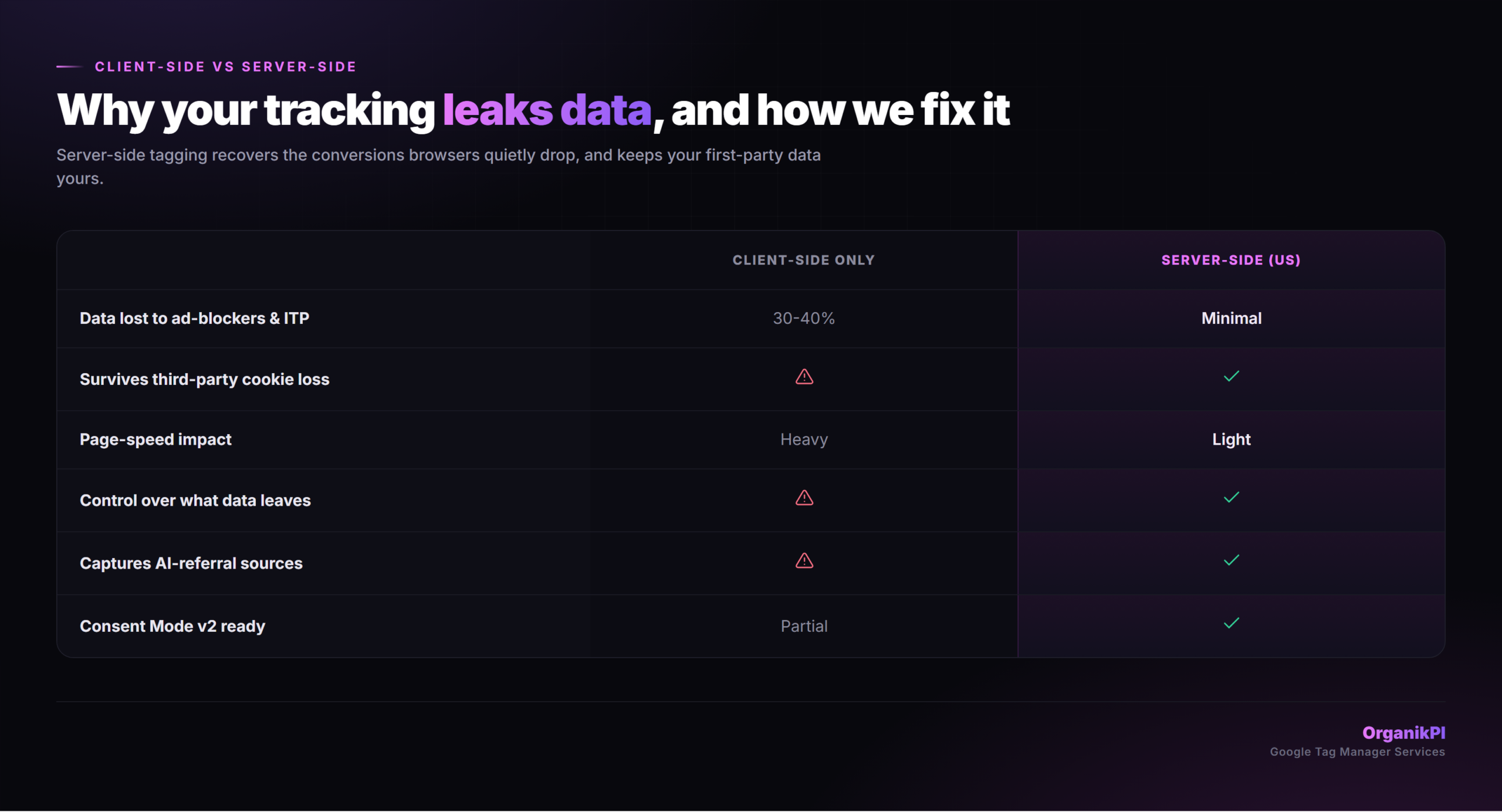
Client-side versus server-side tagging compared

Consent Mode v2: the compliance gap most SaaS sites still have

Google now expects consent signals to flow through your tags in a default-denied state. Get it wrong and you risk non-compliant data collection and degraded conversion modeling at the same time. Run the 60-second self-check.
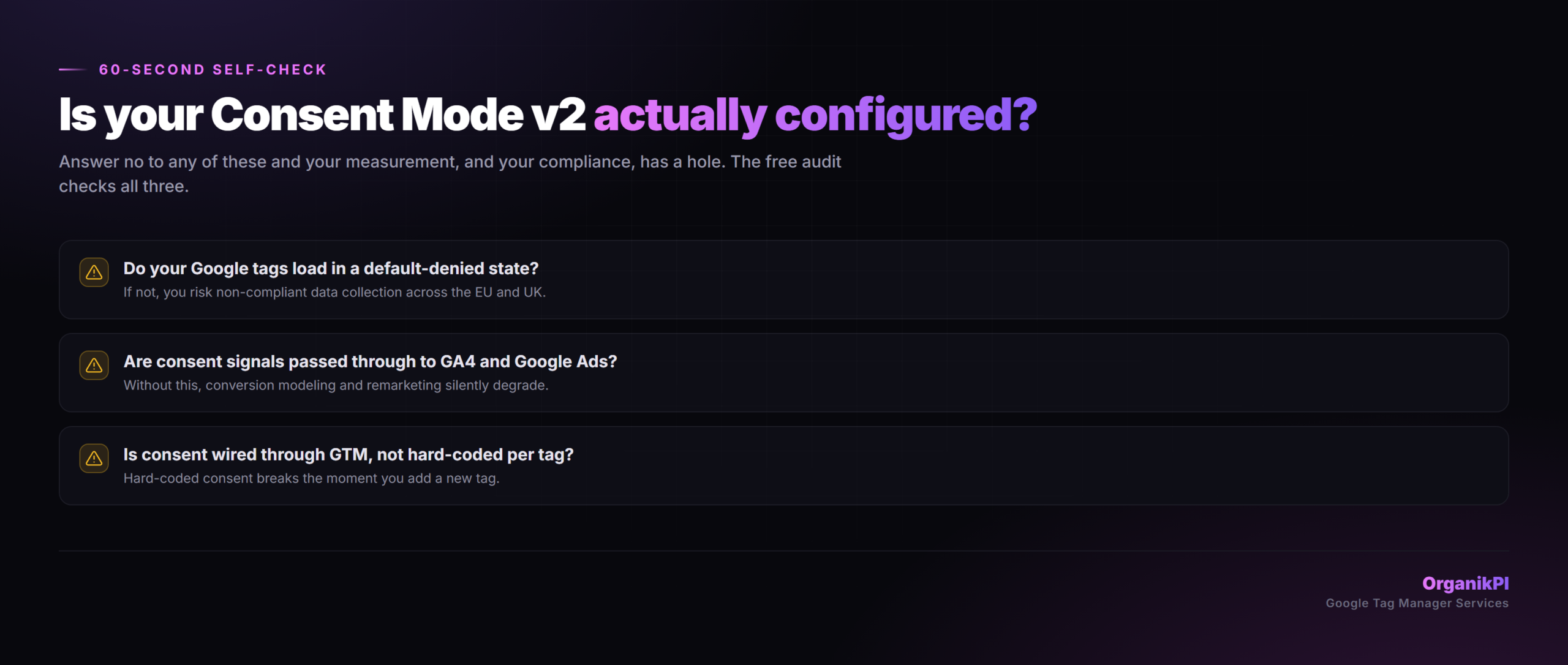
Consent Mode v2 readiness self-check

The free 12-point tracking audit

Before we touch anything, we teardown your container and show you exactly what is broken and what it is costing you. Every gap is a fix we can scope.
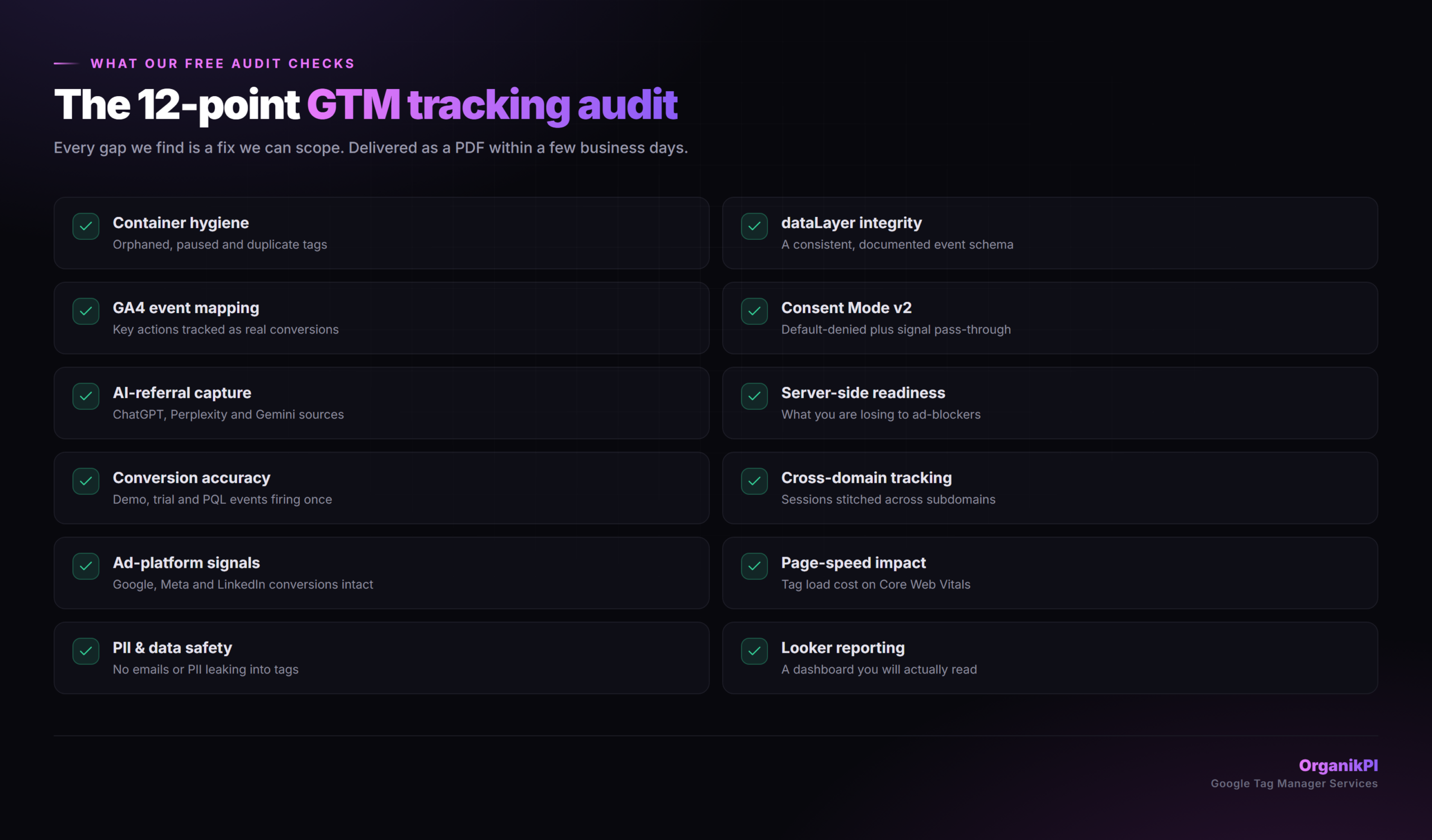
The 12-point Google Tag Manager tracking audit checklist
How Google Tag Manager makes AI search traffic visible in GA4

The channel GA4 hides from you

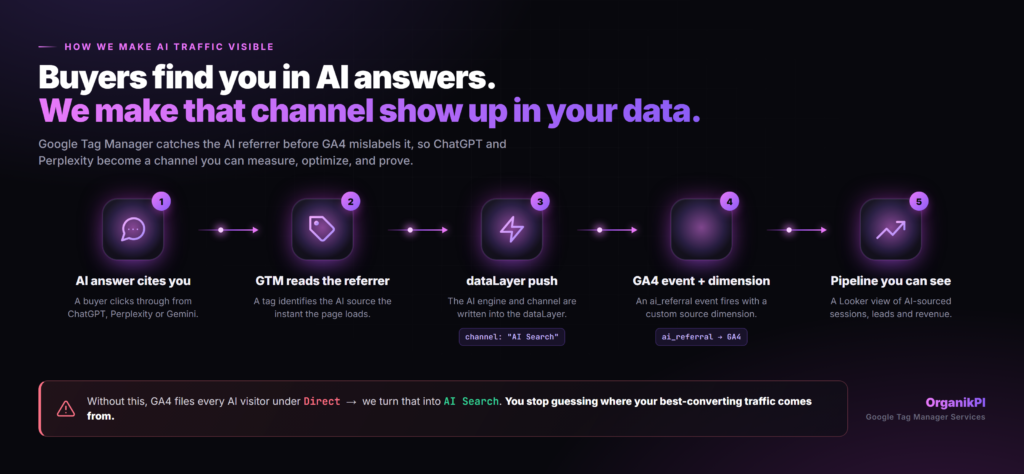
When a buyer arrives from ChatGPT or Perplexity, GA4 files them under “Direct” by default. So the fastest-growing source of high-intent traffic is invisible in your reporting.

We catch the AI referrer in Google Tag Manager before GA4 mislabels it, push it into the dataLayer, and surface it as its own channel in a Looker dashboard. You stop guessing where your best-converting traffic comes from.

What we build

Container audit and cleanup: orphaned tags, duplicate events, and the gaps killing your data quality.
dataLayer architecture: a consistent, documented schema your whole stack can rely on.
GA4 events and conversions: demo, trial and PQL actions tracked as real conversions, firing once.
Server-side tagging: a server container that recovers the conversions browsers quietly drop.
AI-referral tracking: ChatGPT, Perplexity, Gemini and Copilot captured as their own channel.
Consent Mode v2: default-denied, signal pass-through, configured the way Google now requires.
Looker starter dashboard: a reporting view your team will actually open.

How the build runs

  1. Audit (days 1-5)

    We teardown your container, dataLayer and GA4 setup and document every gap.

  2. Build (days 6-18)

    We implement server-side tagging, AI-referral tracking, Consent Mode v2 and your conversion events.

  3. Handoff (days 19-21)

    We QA in DebugView, ship a Looker starter dashboard, and document everything for your team.

Ways to work together

We do not publish fixed prices. Every engagement is scoped to your stack, goals and KPIs. Pick the closest fit and request a personalized quote, and we will scope the details together on a quick call.

Tracking audit

Custom

A full teardown of your current setup.

  • 12-point container audit
  • dataLayer and consent review
  • Prioritized fix list
  • Delivered as a PDF

Ongoing measurement

Custom

We own your tracking so you do not have to.

  • Monthly QA and tag updates
  • New conversion events as you ship
  • Quarterly data-quality review
  • Direct Slack access

Google Tag Manager questions, answered

What does a Google Tag Manager consultant actually do?
We design and build the tracking layer that sits between your website and your analytics: the dataLayer, GA4 events, server-side container, consent setup and the dashboards on top. Done right, it turns messy, leaking data into numbers you can trust and act on.
Can you really track traffic from ChatGPT and Perplexity?
Yes. We detect the AI referrer in Google Tag Manager the moment the page loads, write it into the dataLayer, and surface it in GA4 as its own channel, instead of letting it disappear into "Direct."
What is server-side tagging and do I need it?
It moves tag execution from the browser to a server you control. That recovers conversions lost to ad-blockers and browser privacy, protects your first-party data, and reduces the page-speed cost of tags. If your conversions matter, you need it.
Will this fix my Consent Mode v2 setup?
Yes. We configure consent in a default-denied state with proper signal pass-through to GA4 and Google Ads, wired through Google Tag Manager rather than hard-coded per tag, so it keeps working as you add tags.
How much conversion data am I losing right now?
Industry estimates put client-side data loss in the 30 to 40 percent range from ad-blockers and browser privacy alone. The free audit gives you a real number for your site.
Do you work with our existing container or start fresh?
Either. We usually audit what you have first, then decide whether to clean it up or rebuild, based on how much technical debt is in there.
How long does a build take?
A typical server-side build runs about three weeks from audit to handoff, depending on the complexity of your stack and conversion events.
What is in the free tracking audit?
A 12-point teardown of your container, dataLayer, GA4 events, consent setup and AI-referral readiness, with a prioritized list of what to fix first. Delivered as a PDF, no obligation.

Stop guessing where your traffic comes from

Get a free 12-point tracking audit. We will show you what your current setup is missing, what it is costing you, and the AI traffic GA4 is hiding from you.